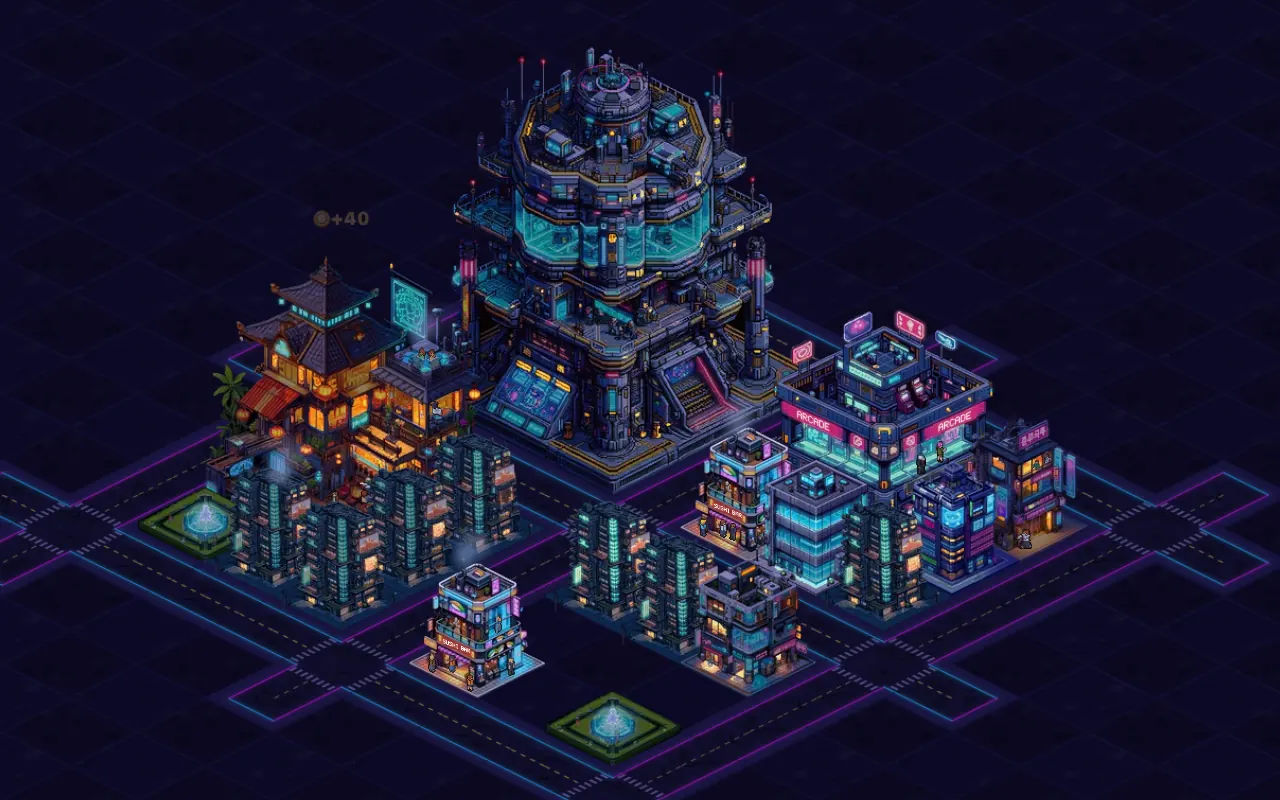
Cashmate is a free city tycoon in your browser: lay roads, build homes and shops, set prices
and watch a neon city come alive, day and night. This guide explains every rule. Its numbers are
not copied by hand: they are generated from the game's own code every time the site is built.
A new city opens at 18:00 on day 1 with
4,000 coins and a free downtown of 10×10 tiles. Downtown
already has a little street with three Residential Towers, a Sushi Bar and a Fountain Park: 30 residents and your first
shop. Everything around it is land for sale.
Time runs at one city minute per real second, so a full day and night takes 24
real minutes. The clock changes the look of the city and who is out in the streets and inside the
buildings, but earnings do not depend on the hour.
Your first ten minutes
The first chapter of goals walks you through the basics. The goal card (top left on a computer, a
pill under the top bar on a phone) shows each step and pays a fixed reward when you press
Collect:
Draw a road. Pick Road and drag across your land. +80
Build a home. Build → Residential Tower, next to a road. +300
Build an Arcade. Build → Arcade next to a road, near homes. Your town already has food. +360
Check your Arcade’s price. Open the Arcade and keep it at its best price (tap Use best price if it moved). +110
Place a park next to homes. Build → Fountain Park within 3 tiles of homes: happier homes buy more. +200
Collect all 5 goals and the chapter bonus adds +230.
Together that is 1,280 coins, about what the chapter's purchases cost, so you
finish it with at least as many coins as you started with.
Good habits from the start
Roads first. A building must touch a road along one side to be placed at all,
and to keep working.
Shops near homes. A shop's customers come from homes within its reach, and its
workers from homes within 10 tiles.
Mix the markets. Every home shops in each market (food, fun, care, work, goods)
that has a shop in reach. A new kind of shop finds fresh customers; a second shop of the same
kind shares them.
Watch the top bar. It shows your coins and your net income per minute. Tap or
hover any number for a breakdown.
What comes next
More residents unlock new buildings, your first plots of land give you room to grow, and the
City HQ unlocks level 3 for the buildings that have one. The goal track leads you
there through 7 chapters and then keeps going (see
Goals and chapters).
Controls
Tools
The toolbar at the bottom of the screen.
Tool
Key
What it does
Select
V
Click or tap a building to open its panel; click land for sale to see its price.
Road
R
Drag across your land to draw a road.
Build
B
Opens the build menu: pick a building, then place it next to a road.
Bulldozer
X
Drag over roads to remove them; click a building to demolish it.
Buy land
L
Click a plot with a For-Sale sign to see its price and buy it.
Mouse and keyboard
Mouse and keyboard controls.
To
Do this
Move the map
Drag with the left button (with the Road tool and the Bulldozer it draws instead). In
every tool: drag with the right or middle button, or hold Space and drag, or
hold Arrows / WASD.
Zoom
Mouse wheel, + / − or the zoom buttons.
Centre on a spot
Double-click the map (Select tool).
Go back to downtown
H or the home button next to the zoom buttons.
Undo the last action
Ctrl / ⌘ + Z, within 10 seconds.
Cancel
Esc: the first press cancels a road or a placement in progress, the next closes
the build menu, then leaves the tool, then clears the selection. A right-click without
dragging cancels too.
Music on or off
M
Open the help
?
On a computer you place a building with a click: its see-through ghost follows the pointer and
shows the price, or in red why it cannot go there. Keys never fire while you type in a field or
while a dialog is open.
Touch
Tap a building to open its panel, or a plot for sale to see its price.
Drag with one finger to move the map. With the Road tool or the Bulldozer one finger draws, so
move the map with two fingers.
Pinch to zoom. Double-tap to centre the map there.
Placing works in two steps: the first tap puts a ghost of the building, which you can drag into
place; press ✓ to build and pay, or ✕ to cancel. After ✓ a new
ghost offers another one nearby.
Press and hold a card in the build menu to see its details.
On the screen
Top bar
Coins and net income per minute (a ✦ marks income that includes the new-city bonus),
residents, happiness and the city clock. Tap or hover each one for a breakdown. Next to them:
the radio, help and settings.
Goal card
The current chapter's goals with their rewards and a Collect button when one is met.
Saving for
After the first chapter, a chip names the next sensible purchase and how long your income
needs to afford it.
Issues
A chip that appears when buildings have a problem; each press moves the camera to the next
one.
Toolbar
The five tools, the zoom buttons and the home button.
Building and roads
Roads
Pick Road and drag across land you own. Road costs
10 coins per tile; a label at the end of the stroke shows its length
and price. Tiles that cannot take road turn red with the reason (land you don't own yet, a
building in the way, not enough coins). When you let go, the road is built from where you started
up to the first red tile. Roads cost a tiny upkeep: 0.06 coins per tile per minute.
To remove road, drag the Bulldozer over it: you get 5 coins back
per tile (50 %). Buildings that would lose their only road light up amber before
you let go.
The road rule
Every building needs a road tile directly beside one of its sides; a road that
only touches a corner does not count. Without one you cannot place the building, and a building
that loses its road closes (no sales, no upkeep) until you draw a new one.
Placing a building
Open Build, pick a card in one of the tabs (Homes, Shops, Community, Landmarks)
and place it. Buildings come in footprints of 1×1, 2×2 and 3×3 tiles. When you pick a card, every
valid spot is tinted and the road edges the building would touch glow; community buildings and
shops also show their reach. A red ghost says why it cannot go there:
Needs a road along one side: draw a road beside
it first.
Buy this land first: the spot is on a plot you don't
own.
Overlaps a building or
Overlaps a road: find a free spot of the right size.
Unlocks at … residents: grow your city first.
Only one City HQ per city: it is unique.
Outside the map: the building would stick out over the
edge.
Need … more: you are short of coins, and it says by how many.
In the Build or Road tool, a click on an existing building simply opens it. The build menu lists
what you can build first, then a Coming up next row with the residents each locked
building still needs.
Every copy costs more
The first of each building is the cheapest. Each further home costs 6 % more
than the one before, each further shop of the same kind 30 % more, and each further
community building 35 % more. Every card in the build menu shows what the next one
costs.
The buildings your city starts with count as copies too: your next Residential Tower costs 300, your next Sushi Bar 520 and your next Fountain Park 270 coins. The catalog
lists the price of the very first one of each kind and, for these, your next one.
Undo
Changed your mind? After you place a building, draw or remove road, demolish, cancel a
construction, start an upgrade or buy land, a notice with Undo stays for
10 seconds. Undo (or Ctrl / ⌘ + Z) reverses the action exactly and gives
back every coin it cost. You can step back through your last 5 actions, newest first,
each within its 10 seconds. Collecting a goal reward, importing a save or starting a
new city clears the undo history. Land can be returned only while nothing has been built on it.
Demolishing
Pick the Bulldozer and click a building. You get 50 % of
everything you spent on it (building and upgrades) back, or all of it if you undo within
10 seconds. A building that is still a construction site is not demolished: you
cancel it and get every coin back (see Upgrades and construction).
Every building stands beside a road: homes, shops, parks and, later, the City HQ.
Building catalog
All 22 buildings, straight from the game's balance table. Prices are for your
first one of each; build times are real time.
Every building at a glance. Cost is the price of the first one; for the buildings your city starts with, the price of your next one follows.
Under level one: the price to build your first one. Under the higher levels: the price of each
upgrade of that first one.
Output per minute
What a shop makes each minute with all its workers. Half the workers make half as much.
Stock shelf
How much a shop can hold before it stops adding to its shelf.
Appeal
A shop's pull within its market: shops in reach of the same home split its customers by
appeal, and higher appeal also makes each customer buy more.
Customers from
The shop's reach: homes within that many tiles of it send customers (see
Counting tiles).
Happiness and reach
Community buildings add their points to every home within their reach.
Homes
Homes house residents. Half of them work in shops within 10 tiles, and everyone shops.
Residential Tower
Home1×1 tilesFrom the start
Homes for workers and customers.
Levels
3 (level 3 needs the City HQ)
Residential Tower by level
Per level
Level 1
Level 2
Level 3
Cost
250
1,400
7,500
Build time
20s
1m 30s
5m
Residents
10
24
44
Workers it provides
5
12
22
Upkeep per minute
0.6
1.5
3
Each extra copy costs 6 % more than the one before: 250 · 270 · 280 · 300 coins for the first four, and their upgrades grow the same way. Your city starts with 3, so the next one you build costs 300.
Food shops
Shops in the food market share their customers with each other.
Sushi Bar
Shop · Food1×1 tilesFrom the start
Small, quick, always busy.
Market
Food · sells sushi
Customers from
homes within 6 tiles
Price
up to 8 coins per unit
Levels
1
Sushi Bar by level
Per level
Level 1
Cost
400
Build time
34s
Workers needed
2
Output per minute
6
Stock shelf
20
Appeal
1
Upkeep per minute
4.8
Each extra copy costs 30 % more than the one before: 400 · 520 · 680 · 880 coins for the first four. Your city starts with 1, so the next one you build costs 520.
Dragon Noodle House
Shop · Food2×2 tilesUnlocks at 50 residents
Steaming bowls under a dragon sign.
Market
Food · sells noodles
Customers from
homes within 8 tiles
Price
up to 10 coins per unit
Levels
1
Dragon Noodle House by level
Per level
Level 1
Cost
2,400
Build time
1m 9s
Workers needed
6
Output per minute
21.6
Stock shelf
72
Appeal
1.15
Upkeep per minute
21.6
Each extra copy costs 30 % more than the one before: 2,400 · 3,100 · 4,100 · 5,300 coins for the first four.
Waterfall Tea House
Shop · Food2×2 tilesUnlocks at 180 residents
Quiet terraces and a neon waterfall.
Market
Food · sells tea
Customers from
homes within 8 tiles
Price
up to 16 coins per unit
Levels
1
Waterfall Tea House by level
Per level
Level 1
Cost
5,500
Build time
1m 39s
Workers needed
8
Output per minute
30
Stock shelf
100
Appeal
1.3
Upkeep per minute
48
Each extra copy costs 30 % more than the one before: 5,500 · 7,200 · 9,300 · 12,000 coins for the first four.
Night Market
Shop · Food2×2 tilesUnlocks at 320 residents
Lanterns, stalls and late-night crowds.
Market
Food · sells street food
Customers from
homes within 9 tiles
Price
up to 14 coins per unit
Levels
1
Night Market by level
Per level
Level 1
Cost
9,000
Build time
2m 4s
Workers needed
12
Output per minute
48
Stock shelf
160
Appeal
1.4
Upkeep per minute
67.2
Each extra copy costs 30 % more than the one before: 9,000 · 12,000 · 15,000 · 20,000 coins for the first four.
Fun shops
Shops in the fun market share their customers with each other.
Arcade
Shop · Fun2×2 tilesFrom the start
Blinking cabinets and high scores.
Market
Fun · sells game credits
Customers from
homes within 7 tiles
Price
up to 12 coins per unit
Levels
3 (level 3 needs the City HQ)
Arcade by level
Per level
Level 1
Level 2
Level 3
Cost
600
1,500
18,000
Build time
39s
1m 43s
5m 32s
Workers needed
4
6
9
Output per minute
7.2
14.4
26.4
Stock shelf
24
48
88
Appeal
1
1.25
1.5
Upkeep per minute
8.6
17.3
31.7
Each extra copy costs 30 % more than the one before: 600 · 780 · 1,000 · 1,300 coins for the first four, and their upgrades grow the same way.
Karaoke Bar
Shop · Fun1×1 tilesUnlocks at 40 residents
Private booths, loud nights.
Market
Fun · sells song rooms
Customers from
homes within 8 tiles
Price
up to 16 coins per unit
Levels
2
Karaoke Bar by level
Per level
Level 1
Level 2
Cost
900
2,100
Build time
46s
2m
Workers needed
3
5
Output per minute
8.4
16.8
Stock shelf
28
56
Appeal
1
1.25
Upkeep per minute
13.4
26.9
Each extra copy costs 30 % more than the one before: 900 · 1,200 · 1,500 · 2,000 coins for the first four, and their upgrades grow the same way.
Neon Tower
Shop · Fun1×1 tilesUnlocks at 150 residents
A club stacked into one bright tower.
Market
Fun · sells club nights
Customers from
homes within 8 tiles
Price
up to 20 coins per unit
Levels
1
Neon Tower by level
Per level
Level 1
Cost
4,000
Build time
1m 26s
Workers needed
6
Output per minute
18
Stock shelf
60
Appeal
1.2
Upkeep per minute
36
Each extra copy costs 30 % more than the one before: 4,000 · 5,200 · 6,800 · 8,800 coins for the first four.
Sky Lounge
Shop · Fun2×2 tilesUnlocks at 400 residents
Cocktails above the skyline.
Market
Fun · sells rooftop evenings
Customers from
homes within 9 tiles
Price
up to 24 coins per unit
Levels
1
Sky Lounge by level
Per level
Level 1
Cost
12,000
Build time
2m 21s
Workers needed
12
Output per minute
42
Stock shelf
140
Appeal
1.5
Upkeep per minute
100.8
Each extra copy costs 30 % more than the one before: 12,000 · 16,000 · 20,000 · 26,000 coins for the first four.
Care shops
Shops in the care market share their customers with each other.
Beauty House
Shop · Care2×2 tilesUnlocks at 70 residents
Glow-ups for the whole block.
Market
Care · sells treatments
Customers from
homes within 6 tiles
Price
up to 18 coins per unit
Levels
3 (level 3 needs the City HQ)
Beauty House by level
Per level
Level 1
Level 2
Level 3
Cost
700
1,700
19,000
Build time
42s
1m 49s
5m 41s
Workers needed
3
4
6
Output per minute
4.8
9.6
18
Stock shelf
16
32
60
Appeal
1
1.25
1.5
Upkeep per minute
8.6
17.3
32.4
Each extra copy costs 30 % more than the one before: 700 · 910 · 1,200 · 1,500 coins for the first four, and their upgrades grow the same way.
Bath House
Shop · Care2×2 tilesUnlocks at 100 residents
Steam, tiles and neon koi.
Market
Care · sells soaks
Customers from
homes within 8 tiles
Price
up to 14 coins per unit
Levels
3 (level 3 needs the City HQ)
Bath House by level
Per level
Level 1
Level 2
Level 3
Cost
1,200
2,700
28,000
Build time
52s
2m 15s
6m 52s
Workers needed
6
9
14
Output per minute
9.6
19.2
36
Stock shelf
32
64
120
Appeal
1
1.25
1.5
Upkeep per minute
13.4
26.9
50.4
Each extra copy costs 30 % more than the one before: 1,200 · 1,600 · 2,000 · 2,600 coins for the first four, and their upgrades grow the same way.
Gym
Shop · Care2×2 tilesUnlocks at 220 residents
Treadmills facing the neon.
Market
Care · sells workouts
Customers from
homes within 8 tiles
Price
up to 16 coins per unit
Levels
1
Gym by level
Per level
Level 1
Cost
6,000
Build time
1m 43s
Workers needed
8
Output per minute
30
Stock shelf
100
Appeal
1.3
Upkeep per minute
48
Each extra copy costs 30 % more than the one before: 6,000 · 7,800 · 10,000 · 13,000 coins for the first four.
Work shops
Shops in the work market share their customers with each other.
Office Block
Shop · Work2×2 tilesUnlocks at 120 residents
Desks, screens and deadlines.
Market
Work · sells office services
Customers from
homes within 10 tiles
Price
up to 20 coins per unit
Levels
3 (level 3 needs the City HQ)
Office Block by level
Per level
Level 1
Level 2
Level 3
Cost
1,500
3,500
36,000
Build time
56s
2m 32s
7m 45s
Workers needed
6
10
15
Output per minute
9
18
33.6
Stock shelf
30
60
112
Appeal
1
1.25
1.5
Upkeep per minute
18
36
67.2
Each extra copy costs 30 % more than the one before: 1,500 · 2,000 · 2,500 · 3,300 coins for the first four, and their upgrades grow the same way.
Business Building
Shop · Work2×2 tilesUnlocks at 160 residents
Meetings on every floor.
Market
Work · sells consulting
Customers from
homes within 10 tiles
Price
up to 22 coins per unit
Levels
3 (level 3 needs the City HQ)
Business Building by level
Per level
Level 1
Level 2
Level 3
Cost
2,000
4,500
45,000
Build time
1m 4s
2m 51s
8m 39s
Workers needed
8
12
18
Output per minute
12
24
43.2
Stock shelf
40
80
144
Appeal
1
1.25
1.5
Upkeep per minute
26.4
52.8
95
Each extra copy costs 30 % more than the one before: 2,000 · 2,600 · 3,400 · 4,400 coins for the first four, and their upgrades grow the same way.
Glass Office
Shop · Work1×1 tilesUnlocks at 260 residents
A studio in a glass box.
Market
Work · sells design work
Customers from
homes within 10 tiles
Price
up to 24 coins per unit
Levels
1
Glass Office by level
Per level
Level 1
Cost
5,000
Build time
1m 35s
Workers needed
7
Output per minute
18
Stock shelf
60
Appeal
1.2
Upkeep per minute
43.2
Each extra copy costs 30 % more than the one before: 5,000 · 6,500 · 8,500 · 11,000 coins for the first four.
Goods shops
Shops in the goods market share their customers with each other.
Reactor Works
Shop · Goods3×3 tilesUnlocks at 240 residents
Big output, noisy neighbour.
Market
Goods · sells gadgets
Customers from
homes within 14 tiles
Price
up to 18 coins per unit
Levels
2
Noise
−8 happiness for homes within 3 tiles
Reactor Works by level
Per level
Level 1
Level 2
Cost
3,500
7,500
Build time
1m 21s
3m 38s
Workers needed
14
22
Output per minute
24
45.6
Stock shelf
80
152
Appeal
1
1.25
Upkeep per minute
43.2
82.1
Each extra copy costs 30 % more than the one before: 3,500 · 4,600 · 5,900 · 7,700 coins for the first four, and their upgrades grow the same way.
Glass House
Shop · Goods2×2 tilesUnlocks at 280 residents
A boutique you can see right through.
Market
Goods · sells designer goods
Customers from
homes within 12 tiles
Price
up to 18 coins per unit
Levels
1
Glass House by level
Per level
Level 1
Cost
7,000
Build time
1m 50s
Workers needed
9
Output per minute
33
Stock shelf
110
Appeal
1.3
Upkeep per minute
59.4
Each extra copy costs 30 % more than the one before: 7,000 · 9,100 · 12,000 · 15,000 coins for the first four.
Plaza Tower
Shop · Goods2×2 tilesUnlocks at 360 residents
Five floors of shops under one sign.
Market
Goods · sells shopping
Customers from
homes within 12 tiles
Price
up to 16 coins per unit
Levels
1
Plaza Tower by level
Per level
Level 1
Cost
10,000
Build time
2m 10s
Workers needed
12
Output per minute
48
Stock shelf
160
Appeal
1.4
Upkeep per minute
76.8
Each extra copy costs 30 % more than the one before: 10,000 · 13,000 · 17,000 · 22,000 coins for the first four.
Community
Community buildings sell nothing: they make every home in reach happier.
Fountain Park
Community1×1 tilesFrom the start
A fountain lifts the mood nearby.
Levels
1
Fountain Park by level
Per level
Level 1
Cost
200
Build time
10s
Happiness
+8
Reach
3 tiles
Upkeep per minute
1.8
Each extra copy costs 35 % more than the one before: 200 · 270 · 360 · 490 coins for the first four. Your city starts with 1, so the next one you build costs 270.
Community Hall
Community2×2 tilesUnlocks at 60 residents
Events and classes: happier homes in a wide radius.
Levels
1
Community Hall by level
Per level
Level 1
Cost
1,500
Build time
1m
Happiness
+15
Reach
6 tiles
Upkeep per minute
15
Each extra copy costs 35 % more than the one before: 1,500 · 2,000 · 2,700 · 3,700 coins for the first four.
Dragon Pagoda
Community3×3 tilesUnlocks at 200 residents
A calm landmark that lifts a whole district.
Levels
2
Dragon Pagoda by level
Per level
Level 1
Level 2
Cost
5,000
21,000
Build time
2m
7m
Happiness
+18
+30
Reach
7 tiles
9 tiles
Upkeep per minute
30
66
Each extra copy costs 35 % more than the one before: 5,000 · 6,800 · 9,100 · 12,000 coins for the first four, and their upgrades grow the same way.
Landmark
One per city. It unlocks level 3 for the 6 kinds of building that have one.
City HQ
Landmark3×3 tilesUnlocks at 120 residents
Unique. Unlocks level 3 for the buildings that have one.
Levels
1
Limit
one per city
City HQ by level
Per level
Level 1
Cost
15,000
Build time
5m
Happiness
+12
Reach
9 tiles
Upkeep per minute
30
Unique: one per city.
How the economy works
Counting tiles
Reach, workers' commute and crowding are all counted the same way: in steps from the nearest tile
of one building to the nearest tile of the other, with diagonal steps counting like straight ones.
Buildings that touch are 1 tile apart, and with one empty tile between them
they are 2 tiles apart.
So within 3 tiles leaves room for up to 2 empty tiles between a park and the homes
it cheers up.
Residents and workers
Homes house residents: half of them work, and everyone shops. Shops hire from homes
within 10 tiles, the nearest homes first, and older shops hire before newer ones. A shop
with half its workers makes half its output; with none it makes nothing.
Your residents are also your progress: more of them unlock new buildings.
New buildings by residents (the highest number your city has reached).
Every home sends its residents shopping in each market that has a shop whose reach covers the
home. Happiness changes how much they buy: from ×0.5 for a miserable home to
×1.5 for a perfectly happy one. Within one market, the shops in reach of a home
share its customers by appeal. Different markets never compete with each other.
Markets and their shops (customer reach, highest price).
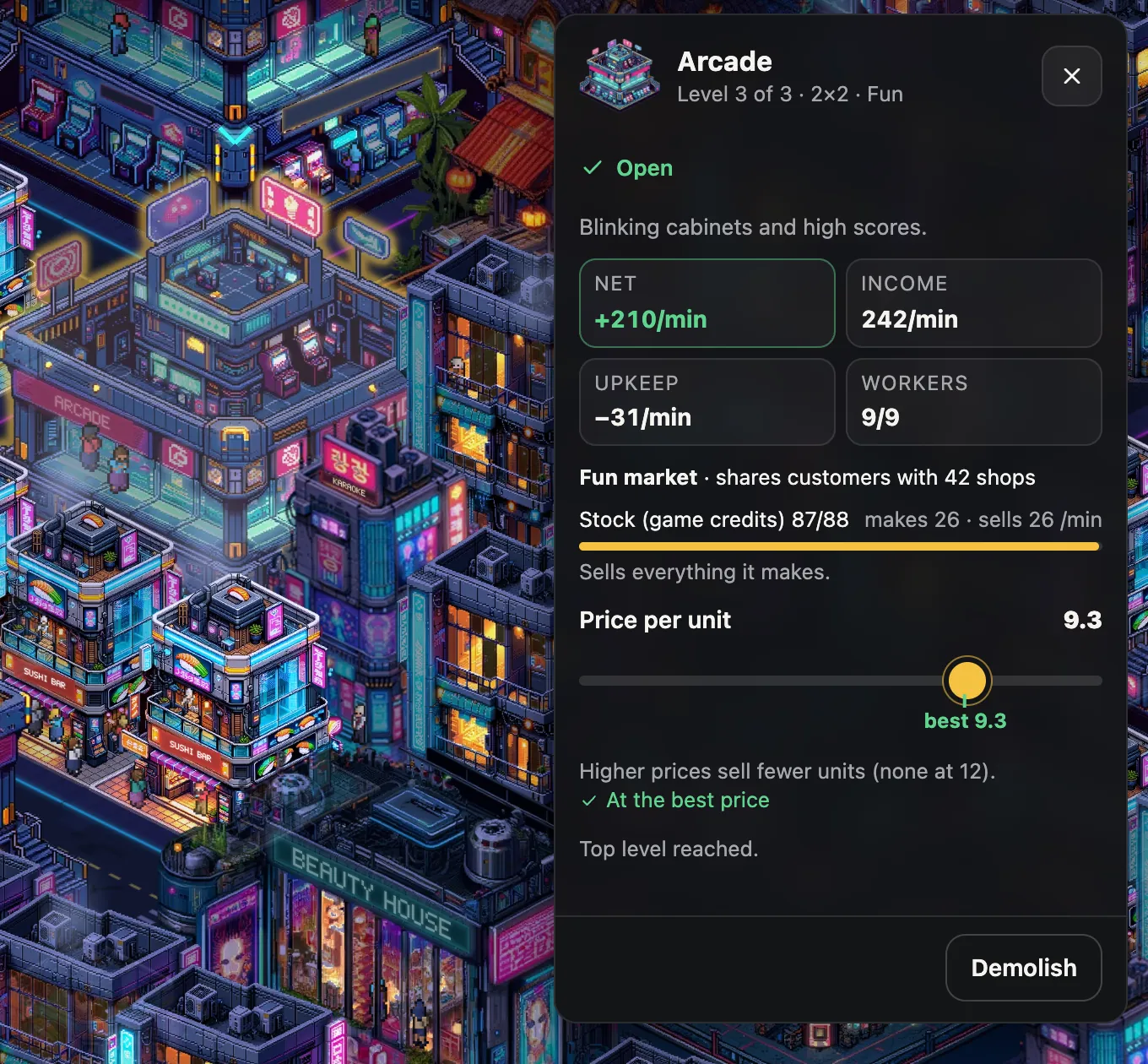
Every shop has a price slider from 0.5 coins up to its highest price. The higher the
price, the less customers buy, in a straight line down to nothing at the highest price. The slider
marks the
best price: the one that earns the most coins per minute from what the shop
makes. When customers want more than the shop can make, the best price rises until demand matches
production; otherwise it sits at half the highest price.
New shops open at their best price. The best price moves as your city changes, though, so look in
now and then: when the slider is off, the panel offers Use best price and says how much
more the shop would earn per minute.
Stock
A shop puts what it makes on its shelf and sells from it every second. The shelf holds about
3 min 20 s of output. The panel explains the state of the shelf: a full shelf means the shop
makes more than it sells (lower the price or add homes in reach); an empty one means it sells
everything it makes (more workers would make more).
Upkeep and net income
Every open building costs upkeep each minute (see the catalog), and roads a little per tile.
Construction sites and buildings cut off from roads pay none. The number next to your coins is
your
net income: what your shops earn per minute at their current prices, minus all
upkeep. A shop's panel shows its own income, upkeep and net.
Competition
Two shops of the same market whose reach covers the same homes share those homes' customers; the
panel says how many shops a shop shares customers with. Spread shops of one market across the
city, or open a different market instead. Upgraded shops have more appeal and win a bigger share.
Happiness
Every home has its own happiness score; the one in the top bar is the average over all residents.
Open a home to see its breakdown.
What makes a home happy.
Factor
Points
Details
Every home starts at
50
The base value.
Community buildings in reach
up to +40
Fountain Park +8 within 3 tiles; Community Hall +15 within 6 tiles; Dragon Pagoda +18 within 7 tiles (level 2: +30 within 9 tiles); City HQ +12 within 9 tiles. Several in reach add up.
Road tiles next to the home
up to +6
+2 for each road tile along its sides.
Crowding
down to −24
−4 for each other home within 2 tiles.
Noise
down to −16
Reactor Works: −8 within 3 tiles.
Happy homes buy more (see Customers and markets). Homes within
2 tiles of each other (at most 1 empty tile between them) crowd
each other: a park between them beats packing homes tightly. Keep noisy industry away from homes.
A shop's panel: net income, market and competition, stock, and the price slider with its best
price.
Land
The map is 32×32 tiles, cut into 64 plots. You own the free downtown from the
start; every other plot shows a For-Sale sign with its price, green when you can afford it. Pick
Buy land (or simply tap the plot) to see its size and price and buy it. A plot's
price depends on:
Size: 60 coins per tile.
Distance: each ring further out from downtown adds 50 %.
Plots you own: every plot you have bought makes the next one 20 %
dearer.
Plots by ring, priced as your first purchase.
Ring
Plots
Sizes
Price
1
12
4×4, 4×5, 5×4
1,440–1,800
2
20
4×4, 4×5, 5×4
1,920–2,400
3
28
3×3, 3×4, 3×5, 4×3, 5×3
1,350–2,250
Every plot you buy makes the next one dearer.
Plots bought
0
1
2
3
5
10
20
Price
×1
×1.2
×1.44
×1.73
×2.49
×6.19
×38.34
For example, a 5×4 plot next to downtown costs 1,800 coins as
your first purchase and 4,480 once you have bought 5 plots.
Buying land can be undone within 10 seconds as long as you have not built on it.
Upgrades and construction
Construction
A new building first stands as a construction site and opens when its timer runs out (the catalog
lists the times). Until then it does nothing and pays no upkeep. Changed your mind? Use the
Bulldozer on the site, or Cancel construction · full refund in its panel: every coin
comes back.
Upgrading
Select a building and press Upgrade. The panel shows what the next level brings
(more residents, output or appeal), what it costs and how long it takes. The building stays open
at its current level while it upgrades. Not every building grows: 13 kinds have a
single level, 3 have two and 6 have three (see the catalog).
The catalog lists upgrade prices for your first building of each kind. Later copies' upgrades cost
more in the same proportion as their build price (see
Every copy costs more).
Level 3 (on the buildings that have one) needs an operating
City HQ. It unlocks at 120 residents, costs 15,000 coins,
and a city can have only one.
Goals and chapters
Goals guide you from your first road to a metropolis. The goal card shows the current chapter.
When you meet a goal, press Collect for its coins; once every goal of a chapter is
collected, its chapter bonus waits. Rewards are fixed amounts, never random. Settings →
Show goals hides the goal card if you prefer to play without it.
How big the rewards are
The first chapter (5 goals) pays fixed rewards: 1,280 coins with
its bonus. From the second chapter on, each chapter has 3 goals. A goal pays
about 1.25 minutes of your city's net income at the moment it appears on the card
(at least 100 coins, at most the amount listed below); a chapter bonus about
2 minutes of income when its chapter starts (at least 250).
A reward is fixed when it appears, so waiting does not make it bigger.
Ticked silently, and previews
A goal only counts during its own chapter. If you already meet it when its chapter starts (you
already have enough residents, say), it is ticked off silently: no reward and nothing to collect,
and the chapter is over sooner. When fewer goals are open than the card has room for, the next
chapter's goals appear greyed out as a preview; they start counting when their chapter begins.
The chapters
Chapter 1First stepsbonus +230
Draw a road +80
Build a home +300
Build an Arcade +360
Check your Arcade’s price +110
Place a park next to homes +200
Chapter 2Growing townbonus up to +1,000
Reach 100 residents up to +600
Earn 200 coins a minute up to +600
Build a Community Hall up to +600
Chapter 3Busy streetsbonus up to +1,200
Reach 150 residents up to +900
Make the city happy: 60 up to +700
Earn 400 coins a minute up to +1,200
Chapter 4Room to growbonus up to +1,500
Buy your first plot up to +900
Reach 200 residents up to +1,400
Upgrade a home to level 2 up to +900
Chapter 5City lifebonus up to +2,500
Reach 240 residents up to +1,500
Earn 800 coins a minute up to +2,400
Upgrade a shop to level 2 up to +1,000
Chapter 6Skylinebonus up to +5,000
Reach 320 residents up to +1,800
Earn 1,600 coins a minute up to +4,800
Build the City HQ up to +3,000
Chapter 7Metropolisbonus up to +10,000
Reach 400 residents up to +2,200
Upgrade a home to level 3 up to +3,000
Earn 3,200 coins a minute up to +9,600
GeneratedMetropolis 2bonus up to +18,000
Reach 500 residents up to +3,000
Earn 4,000 coins a minute up to +12,000
Earn 500,000 coins in total up to +12,000
GeneratedMetropolis 3bonus up to +21,600
Reach 600 residents up to +3,600
Earn 4,800 coins a minute up to +14,400
Earn 800,000 coins in total up to +14,400
GeneratedMetropolis 4bonus up to +25,200
Reach 700 residents up to +4,200
Earn 5,600 coins a minute up to +16,800
Earn 1,280,000 coins in total up to +16,800
After Metropolis the track goes on with generated chapters, Metropolis 2
and onwards, with bigger resident, income and lifetime-earnings goals. It never runs out.
The new-city bonus
A young city gets a head start: at first every shop makes and sells ×3.5 its normal
amount. The bonus shrinks a little every minute and is gone after 60
minutes of play.
New-city bonus on every shop’s output and sales.
Minutes played
0
10
20
30
40
50
60
Bonus
×3.5
×3.1
×2.7
×2.3
×1.8
×1.4
×1
It counts the city's own time, including the time your city runs while you are away, so after a
long break it may be over. A shop's panel shows it (New-city bonus · fades out in …), a ✦
next to your income marks it, and the coins breakdown shows your income without it. When it ends,
income drops to the normal rate: that is expected, not a fault.
While you are away
Your city keeps running when you close the tab. When you come back, the game works out everything
that happened while you were gone (sales, upkeep, constructions finishing) for up to
8 hours; a longer break counts as 8 hours. The
same happens when the tab was in the background.
Away for 2 minutes or more, you are greeted by Welcome back: how long
you were away, the coins your city made (sales and upkeep), its best earners, constructions that
finished, new buildings you unlocked, buildings that need attention, and your next goal. The coins
are already in your account; the button just takes you back to your city. A shorter break may show
a small notice instead.
Problems and how to fix them
A building with a problem gets a badge on the map, and the Issues chip steps you
through them. The building's panel says what is wrong and offers the fix.
The three problem badges.
Badge
What it means
Fix
No road access
No road tile beside the building: it is closed and earns nothing.
No home within 10 tiles has a free worker left for this shop.
Build homes nearby or upgrade the homes around it.
No customers in reach
No home lies within the shop's reach.
Build homes within its reach (listed on its card in the catalog).
Other things to look at
Shelf full
The shop makes more than it sells: lower the price or add homes in its reach.
Priced above its best price
Fewer customers buy: press Use best price in its panel.
Upkeep is higher than sales
The shop loses coins: give it more workers and customers, try the best price, or move it to a
busier spot.
Low happiness
Add parks or a Community Hall, spread homes out and keep noisy industry away from them.
Income suddenly lower
Most often the new-city bonus has ended, or a shop lost its road or
workers.
Nothing affordable
The Saving for chip and every locked card say how long until you can afford them.
Goal rewards help too.
Cashmate Radio
The game has its own radio: 5 stations of original chiptune music, made live in
your browser (no audio files, no streams). The music starts with your first click, tap or key
press in the game, on Neon FM at 30 % volume. Each station shuffles its
songs, with a short station jingle between them.
Cashmate Radio stations.
Station
Style
Songs
Neon FM (default)
Bright synth-pop for busy streets
Rooftop Sunrise, Neon Crosswalk, Coin Fountain, Billboard Hearts
Night Drive
Dark synthwave for the late shift
Midnight Overpass, Taillights in the Rain, Glass Tower Static, After the Last Train
Window Seat Rain, Vending Machine Glow, Laundromat at Two, Slow Tram Home
Sakura Station
Pentatonic chip from the tea-house quarter
Tea House Rain, Lantern Bridge, Dragon Roof Wind, Paper Kite Garden
The radio button (in the top bar; on a phone just below it) opens the stations, what is playing,
back ⏮, play or pause ⏯, next ⏭, the volume with mute, and Music off. On a keyboard,
M turns the music on or off. Settings has the same music switch and volume. Your choice
is saved with your city and kept from then on. The music pauses while the tab is hidden. Sound
effects have their own switch in Settings and are off by default.
Saves and backups
Your city saves itself in this browser every 10 seconds and whenever you leave
the page. Settings → Your city shows when it was last saved. Your settings (sound, music,
motion, goals) are saved with it.
Move or back up your city
Export save downloads your city as a small file.
Import save loads such a file, in another browser or on another device too.
Before anything is replaced, the game compares both cities (day, coins, residents, buildings) and
asks. The city you replace is kept as one automatic backup: Restore backup in
Settings brings it back until your next import.
Start over
Start a new city… deletes your city after asking: the goals start again from the
first chapter and your settings go back to their defaults. A deleted city is not kept as a backup,
so export a copy first if you might want it back.
Good to know
The save lives in this browser's storage for this site. Clearing site data, some private windows
and some cleanup tools delete it; another browser or device has its own city.
If your city matters to you, export a save now and then.
When the game is updated, older saves are converted automatically.
Privacy and fair play
No account. No sign-up, no e-mail, no password.
No tracking. No cookies, no analytics, no ads; the game loads nothing from
other sites. Your city stays in your browser unless you export it.
No cash value. Coins are an in-game currency and have no cash value. You cannot buy them, cash them out or trade
them. Cashmate is free: there are no payments.
No luck for sale. Every reward is a fixed amount of coins; nothing is random.
Calm if you need it. Settings → Reduce motion stops the neon pulse,
blinking signs, camera glides and flying coins. It follows your system setting until you change
it.
Most often the new-city bonus ended. Otherwise a shop may have lost its road
or its workers (look for the Issues chip), or homes became less happy.
Why does every new building cost more?
Each copy of a building costs more than the one before (see
Every copy costs more). A new kind of building is often the better deal.
How do I get more residents?
Build homes next to roads, upgrade them (each level houses more people), and buy land when
downtown is full. Happy homes don't house more people, but they buy more.
My shop sells nothing. Why?
It needs a road, workers and customers. Open it: the panel names what is missing. See
Problems and how to fix them.
Can I play on my phone or tablet?
Yes, in the browser, with touch controls (see Controls).
How do I move my city to another device?
Export a save on the old one and import it on the new one (see
Saves and backups).
I cleared my browser and my city is gone. Can I get it back?
Only from an exported save file. The game keeps your city in your browser alone; there is no copy
anywhere else.
Can I play with friends or trade with them?
No. Cashmate is a single-player game: your city lives in your browser.
Does the time of day matter?
Not for your coins. Day and night change how the city looks and who is out: offices fill by day,
nightlife at night.
What are the little people in the buildings doing?
Living their lives. They are there to watch: they never change your city's numbers.
Can I turn off the music or the sounds?
Yes: press M, use the radio button, or switch them in Settings. Sound effects are off
unless you turn them on.
What happens after the last chapter?
The goals continue with generated chapters (Metropolis 2 and onwards), so there is
always a next goal.
Glossary
Appeal
A shop's pull within its market; upgrades raise it. See
Competition.
Best price
The price that earns a shop the most per minute; marked on its slider.
Chapter
A set of goals with a bonus for finishing it.
Coins
What you build, buy and upgrade with. They exist only in the game and have no cash value.
Copy
Another building of a kind you already have; each costs more than the last.
Footprint
The square of tiles a building stands on.
Happiness
A home's mood score; happier homes buy more.
Level
How far a building is upgraded; level 3, where a building has one, needs the
City HQ.
Market
Food, fun, care, work or goods. Shops compete only within their market.
Net income
Sales per minute minus all upkeep; the number next to your coins.
New-city bonus
The head start that multiplies every shop's output and sales at first and then fades out.
Plot
A piece of land you can buy.
Reach
How far a building's effect goes, in tiles, counted from nearest tile to nearest tile
(diagonal steps count like straight ones). Touching buildings are 1 tile
apart; see
Counting tiles.
Residents
The people living in your homes; some work, all shop.
Ring
How many plots out from downtown a plot lies; further rings cost more per tile.
Stock
The goods on a shop's shelf, waiting to be sold.
Upkeep
What an open building or a road costs each minute.