How to play · Idle
Idle games with offline progress: how to use it well
The best part of an idle or tycoon game is coming back to a city that kept working while you were gone. How much it earned depends on how you left it. This guide explains how offline progress works, what keeps running and what waits for you, and how to set up before a break, with numbers from Cashmate, a free city tycoon in your browser that keeps running while you are away.
The short version: offline time is capped, so come back within the cap. Before you leave, set every shop to its best price, fix closed buildings, and turn idle coins into buildings and upgrades: they keep earning for hours, while unspent coins earn nothing.
How offline progress works
A browser game cannot run while its tab is closed. Instead, when you come back, the game works out what would have happened in between. Idle games differ in how generous that is: some pay a share of the normal rate, some only a fixed bonus, and most stop counting after a while.
Cashmate replays the time you were gone with the same rules as when you watch: shops make and sell, upkeep is paid, construction and upgrades finish. It does this in one step when you return, up to a cap of 8 hours. One real second is one minute of city time, so those hours are 20 days and nights in your city. A longer break counts as 8 hours. A tab left open in the background catches up the same way when you return to it.
What keeps running, and what waits for you
While you are away:
- Shops keep making and selling, at the prices you left them on.
- Upkeep keeps being paid, for buildings and roads.
- Construction sites and upgrades keep counting down and open when they finish. Even the longest construction or upgrade in the game, the Central Station, takes 10 minutes.
- The new-city bonus keeps fading: it counts the city's own time, away time included.
What waits for you:
- Prices stay where you set them. Nothing re-prices itself.
- Nothing new is built, no land is bought and no road is drawn.
- Goal rewards wait on the goal card until you press Collect.
What a full break is worth
Take the city every new Cashmate player starts with: three Apartment Blocks, a Sushi Bar and a Fountain Park. Leave it alone from its very first minute for the full 8 hours and it comes back 9,525 coins richer, the first hour boosted by the new-city bonus. Leave the same city after its first hour, with the Sushi Bar at its best price, and the full cap brings 7,603 coins.
Two small changes make a big difference to that figure:
- A stale price. Leave the Sushi Bar at 6 coins instead of its best price, 4.2, and the same break brings only 4,614: 2,989 coins lost to one slider.
- One more shop. Open an Arcade on the free corner before you go and the same break brings 25,229 coins. It costs 600, opens within a minute, then earns for the whole time you are away.
Before you take a break: a checklist
- Spend your coins. Unspent coins earn nothing while you are away; a new shop or a finished upgrade earns every minute. If the next thing you are saving for is far off, build something smaller now.
- Use the best prices. Open your busiest shops and press Use best price where it appears. The pricing guide explains why it moves.
- Clear the issues. A building with no road, no workers or no customers in reach earns nothing for the whole break. The Issues chip steps you through every one.
- Start the slow jobs. An upgrade you would otherwise wait for finishes quietly while you are away. Start it last, as you leave.
- Mind the cap. After 8 hours nothing more is added, so a morning and an evening visit earn more than one visit a day.
Coming back
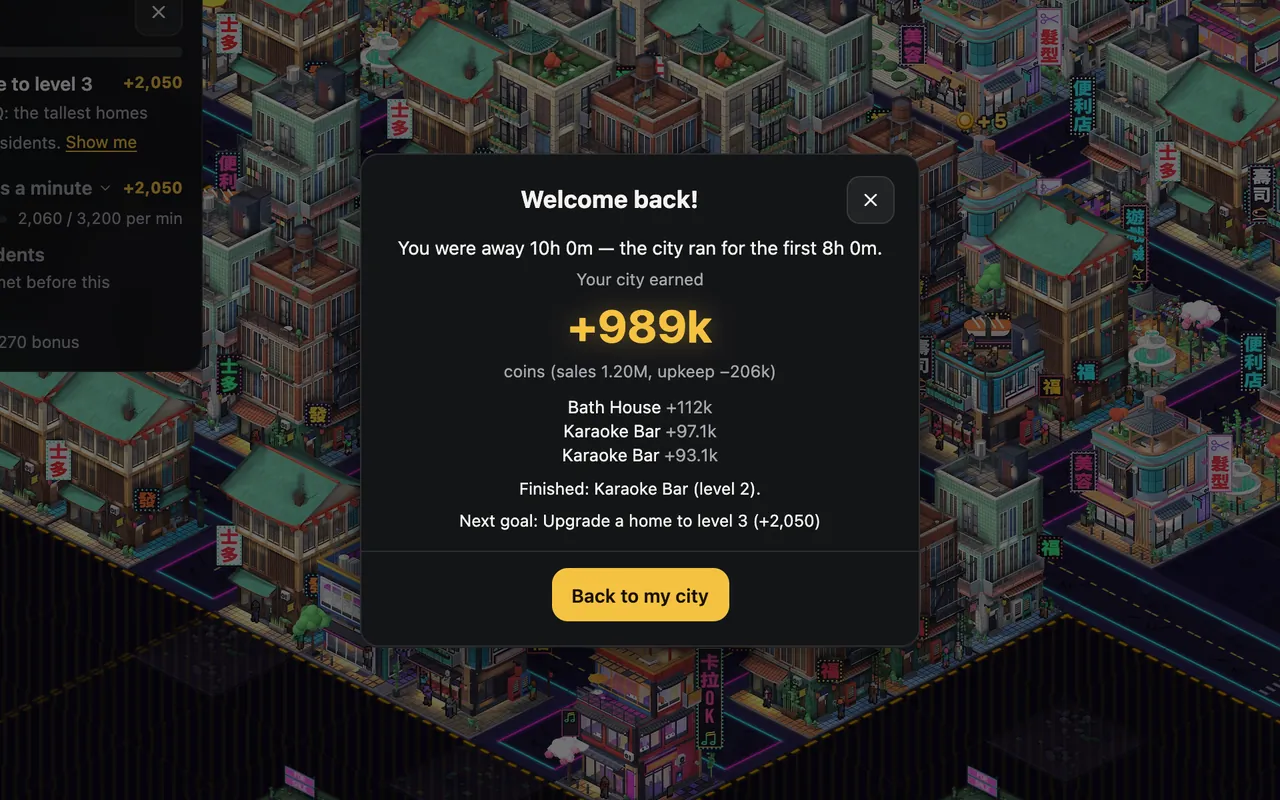
Away for 2 minutes or more, Cashmate greets you with Welcome back!: how long you were gone, what the city earned (sales and upkeep), its best earners, the constructions that finished, buildings you unlocked, buildings that need attention and your next goal. If you were away longer than the cap, it says so. The coins are already added to your city; the button just takes you back to it.
Then do the checklist again in reverse: collect goal rewards, look at what unlocked, and spend what came in. The beginner tips help decide on what.
Offline time and the new-city bonus
A new city's shops make and sell ×3.5 their normal amount at first, fading out over the first 60 minutes of play. Because that clock counts time away, a long break in your first hour uses the bonus up while you are gone. When you come back, the welcome card says it has ended and income is lower than before. Nothing is broken: that is the normal rate. If you want to spend the head start building, play through your first hour before the first long break.
Your save makes it possible
Offline progress needs your city to still be there. Cashmate saves in your browser every 10 seconds and when you leave, without an account. Clearing this site's data in your browser deletes the city, so export a save now and then from Settings. The browser guide covers saving and moving a city to another device.
More guides
The new-city bonus and the welcome-back card in detail: the Cashmate player guide.
-
City builder tips for beginners
Ten rules for your first city: roads, homes, shops, markets, happiness, upgrades and land.
-
City builder road layout: grids, blocks and frontage
Grid or parallel streets? Road spacing compared tile by tile, and how to fill a block.
-
How to price items in a tycoon game
Demand, the best price, stock and competition, worked through one real shop.
-
How to play a city builder in your browser
No download, no account: what you need, the controls, saving and your first minutes.